
Network jacks in every bedroom won't connect a single laptop or TV until someone installs the equipment that runs them, and discovering that on moving day feels a lot like buying a sports car without the keys. That's where GenSmart USA's residential networking equipment design and installation service comes in, pairing the wiring in homes in and around Aberdeen, NC, with the router, switches, and access points they need.
Aberdeen, NC, is home to GenSmart USA, a communications technology company that designs and installs the electronics running residential networks, with brand-new custom builds as its primary focus. For each project, our crew selects the type, size, and number of routers, switches, and wireless access points a house requires, then mounts the routers and switches inside a central telecommunications enclosure and connects their ports to the patch panels where the in-wall cabling terminates. Once that's done, computers, TVs, phones, and smart devices can join a ready-to-use, plug-and-play network right away.
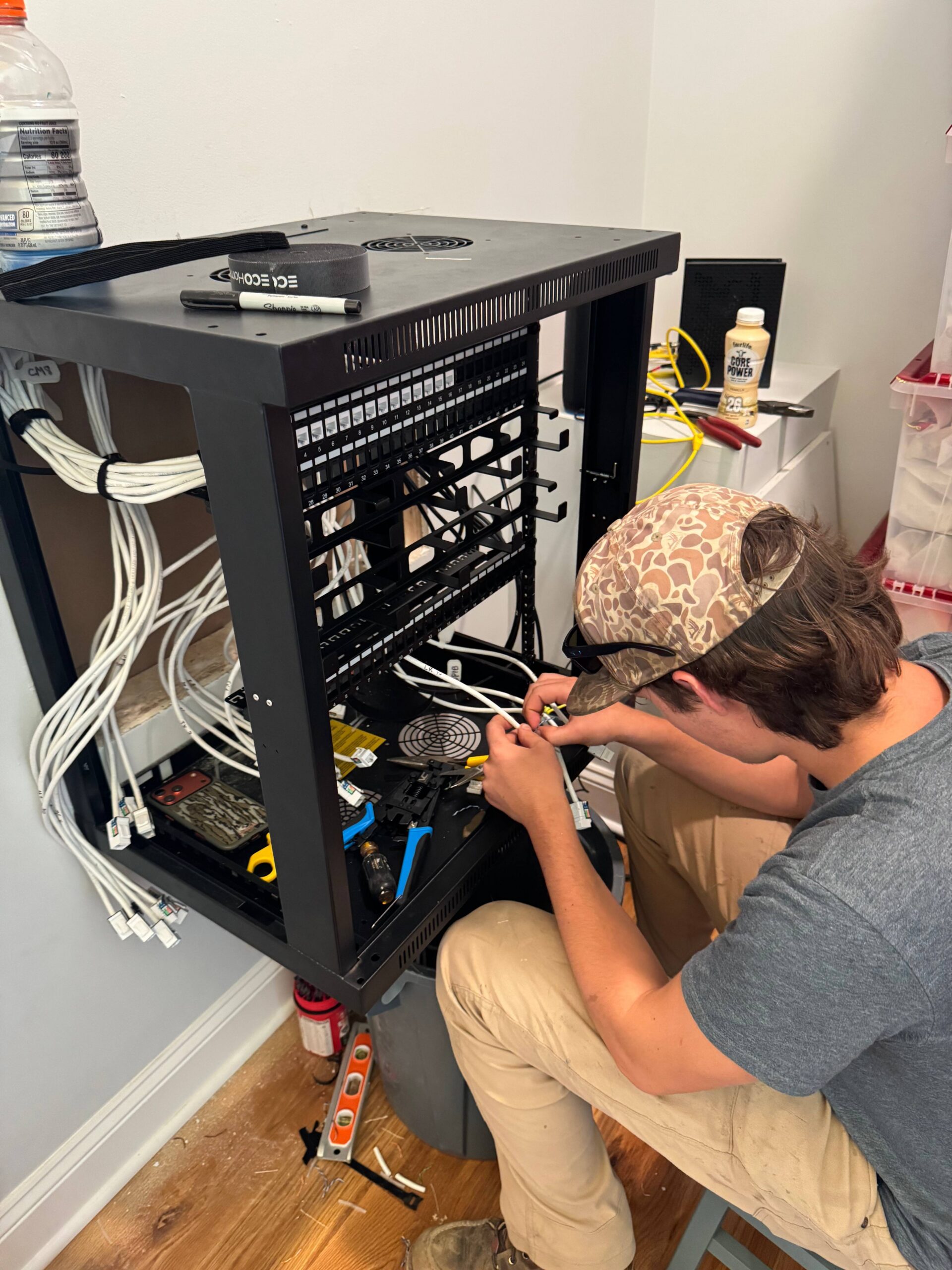
In the home office of a newly built Whispering Pines house, a desktop computer's cord clicks into the wall jack, and nothing happens. The jack behind the living room TV sits just as dead.
During construction, the builder's cabling crew ran wire from every room to patch panels in a laundry room enclosure before heading off to its next job. Choosing the equipment that moves data through those lines never made it onto anyone's checklist, leaving the internet provider's modem on a living room shelf with no link to the panel.
Straightening this out calls for a telecommunications contractor like us who understands the wiring and the electronics that plug into it. Our first stop is that laundry room enclosure, where a glance at the patch panel shows exactly how many runs need something to connect to.
That count guides our picks for the router, a switch with room to grow, and access points for both floors. After mounting the router and switch in the enclosure and hanging access points upstairs and downstairs, we patch each port to its spot on the panel.
Now the desktop connects as soon as it's plugged in. Movies stream over a hardwired link in the living room, and Wi-Fi holds strong from the kitchen to the upstairs bedrooms.
Our residential networking work spans planning, product selection, and the hands-on connections that bring everything online.
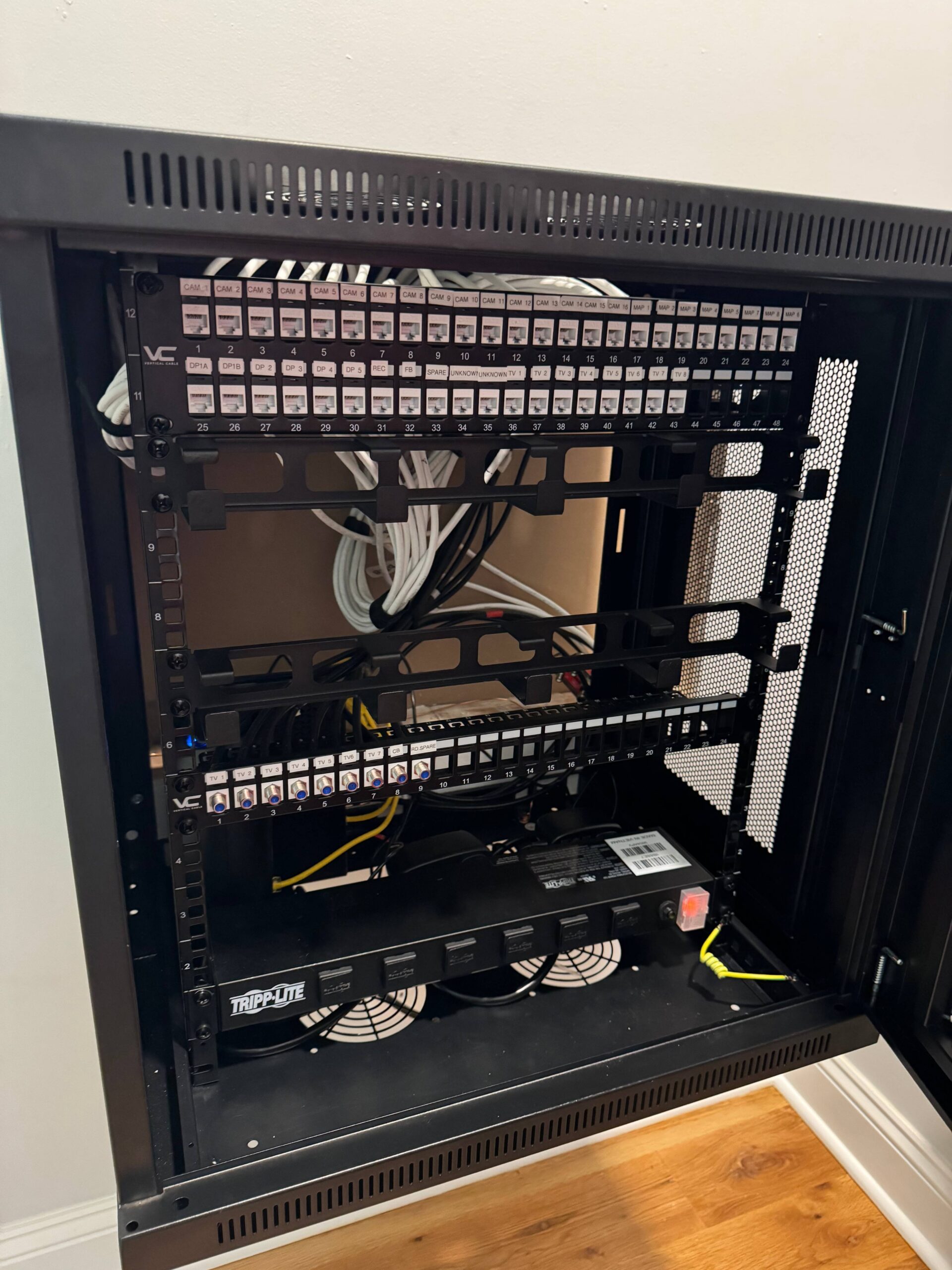
Your home's telecommunications enclosure, usually located in a closet, garage, or utility room, serves as the mission control for the entire network. During a home network equipment installation, we mount the router and switches right beside the patch panels holding your wiring. Having all that gear in one central spot means nobody has to hunt from room to room when something needs a tweak.
Every bit of data entering or leaving your network passes through the router, which acts like a traffic cop at the front door. Busy households full of phones, tablets, streaming boxes, and gaming consoles need a model with enough horsepower for evenings when the whole family streams at once. We choose one based on your internet plan, how many people live there, and how many gadgets compete for bandwidth.
Two dozen cable runs and a router with four open ports make for a lopsided match. Switches even the odds, and we size each one with a connection for every outlet, plus spares for any rooms you decide to wire later.
Metal enclosures block wireless signals, so a router tucked inside one can't cover much ground on its own. Separate access points pick up the slack in your living spaces, and our residential Wi-Fi installation crew links each one back to the enclosure's switch with its own wire. Placement follows your floor plan, giving kitchens, bedrooms, and dens steady coverage.
Before any boxes arrive, we count your wired outlets, list the devices your family uses, and note upcoming additions such as a home theater or smart lighting. That tally drives our home network design, pinning down the right type, size, and quantity for each component. This kind of groundwork keeps you from paying for hardware you'll never use or outgrowing your setup a year after settling in.
Each outlet's cable terminates at a patch panel, which requires a short patch cord to connect to its corresponding port on the switch. With the hardware in place, our crew connects those cords one by one, giving every jack a working path to the internet.
Our structured cabling installation work gives new construction and existing properties a practical way to support phones, computers, internet access, and other connected devices. We route and terminate the cabling where it needs to go, then build out telecom spaces, racks, and cabinets to keep the network infrastructure accessible for future changes.
When copper cabling isn't the right fit for a property's connectivity needs, we turn to fiber. Our fiber optic cabling and installation services support long-distance connections between buildings and facilities, including the pathways, outside-plant cabling, and terminations required to complete the system.
Every property has its own layout, walls, floors, and coverage challenges, which is why we approach mesh Wi-Fi design and installation on a per-space basis rather than using a one-size-fits-all setup. We strategically place wireless access points to provide a consistent connection in the areas where people actually need Wi-Fi.
Before a telecom system is buried behind walls or put into daily use, we help ensure the underlying plan and installation have been properly considered. Our telecommunications design and inspection services cover custom infrastructure planning, telecom room layouts, system assessments, and independent reviews of installation work.
These strengths shape how we approach home network projects.
Since our crew runs the wiring and sets up the electronics, your home network installation accounts for every run and device from the start.
Our lead designer spent years planning large-scale military and commercial networks, and those organized habits carry straight into each residential network installation we schedule, whether it's a starter home or an estate with a guest house.
When it's time to pick your home's networking gear, John Babb's Registered Communications Distribution Designer (RCDD) certification puts a highly trained pro behind our recommendations.
Anyone who opens your enclosure after we finish will see tidy rows of cords and gear sitting neatly in place, reflecting the careful approach behind the installation standards John wrote for the U.S. Army Reserve.
You can, and it'll get you online, but provider-supplied routers are usually designed for smaller spaces with fewer devices than a large custom home. One popular approach puts the provider's gateway in bridge mode and lets a higher-performance router, switches, and access points take over the network. That setup gives you stronger coverage, better security controls, and more flexibility as your household adds devices.
If you've got more wired outlets than your router has ports, you'll need one, and most well-wired homes do. A switch takes a single connection from your router and spreads it out to wall jacks, TVs, gaming consoles, and home offices throughout the house. Picking a PoE (Power over Ethernet) model also lets you power Wi-Fi access points and security cameras right through their network cables.
Between summer thunderstorms and the remnants of hurricanes that sometimes sweep inland, North Carolina homes see plenty of lightning and flickering power. A battery backup (UPS) with surge protection for your modem, router, and switches keeps the network running during brief outages and guards against damaging voltage spikes. Proper grounding of your telecommunications enclosure, along with a whole-home surge protector from a licensed electrician, adds another solid layer of defense.
Three main pieces of active equipment make up most home networks: a router, one or more switches, and wireless access points. Internet service comes in through the router, which hands it off to switches that feed wired outlets around the house, while access points spread Wi-Fi to every corner. In a well-planned home, all that gear is housed in a central telecommunications enclosure and connects to patch panels where the in-wall cabling terminates.
The sweet spot comes before the drywall goes up, ideally while you're still finalizing floor plans with your builder. An early start gives you time to pick outlet locations, access point spots, and a central enclosure while your installer sizes the right equipment to match. Homeowners building around Aberdeen, Southern Pines, and Pinehurst who plan ahead get a plug-and-play network on move-in day and skip the hassle of retrofitting later.
FAQs reviewed by John Babb, lead designer and technician at GenSmart USA, a certified telecommunications contractor.
Your wall jacks have sat idle long enough. GenSmart USA can choose the right equipment for your house, so grab your phone and let us know when to stop by.
Business Name: GenSmart USA
Address: Aberdeen, NC, 28315
Phone: 910-514-8753
Business Hours:
Mon - Fri: 08:00 AM to 06:00 PM
Sat-Sun: Closed
For subscription users, emergency service is provided
Call us for financing options
For subscription users, 5% off of labor work. Diagnostic fee is waived for subscription users. Installation work comes with free one-year subscription.
'Generac' only systems and only for subscribers